Showing posts with label Custom Content. Show all posts

Friday, December 14, 2012

Stop teasing me! Oh, and some music stuffs.


Just stumbled over this while reading Tchos' development diary ---
GOD! How long have I wanted a watermill in NWN2? This is so gorgeous! Beautiful! Amazing!
What a goddamn shame it's from Skyrim and therefore will probably never be available for us. Hey Mr. Mysterious modder, show yourself and make us stuff like this we can actually use! Pretty please? And while you're on it, please do all my custom content wishes for me... ah well, let's start slow.

Another little teaser comes from Tchos himself, I like that:


This video raised a few questions maybe some of you might answer:

1. Do you have any recommendations on free music in a similar style? I was always hoping to find some appropriate tavern music, medieval style, that is free to use. If you have tips on ambient music too, I might be interested - but I'm very picky here! As some might remember, Michael's tip on Arcanum's soundtrack was so far the best addition. If you know of any other free game music in a similar style, I'd be very interested. I'm NOT interested in any Synthie or modern-ish styles though, it must be classic, classy and atmospheric.

2. I was happy to see that old NWN1-style music effect, I also liked the Zzzzz for sleep which I would like to have back too. But I was wondering, does anyone know about flavor text in NWN1's and how to add it?


Finally let me praise Xaltar's Facelift pack again:


I nitpicked a bit about that in the comments, I know, but still... why did it take so long until someone finally did a mod like this that quality-wise goes through the roof compared to the vanilla stuff? I might have some issues with the makeup etc, but still, these heads eliminate the horrible "I have a flashlight in my mouth" problem of the vanilla heads, they look a few years more modern and actually COULD start a wave of new content - because so much else in the game is not on par with the quality of these heads and hopefully some people will say "Hmm, the base armor's texture doesn't work with these heads anymore, I need a retexture...." etc. etc.
I'd say this pack can be a huge advertising for NWN2 (and you should try it right away!). So kudos to Xaltar and hopefully it'll be an inspiration to others.

Sunday, March 4, 2012

Learning 3D stuffs, part three: The showstoppers

Part one
Part two

In this part, which should sum up where I'm standing now, I think it's best to simply answer to some quotes from people trying to help directly or indirectly. This is not to say you're not helpful, quite the opposite! It's only to illustrate where I have the real problems and that the small things many take as given can be horribly frustrating for a newbie.

A while ago I asked Jester for some advice, after he already reinstalled everything NWN2 just to fulfill a model request for me. He's incredibly helpful, but... the thing is that his tips on a workflow mean absolutely nothing to a complete noob, and it actually ended with me thinking "I must come over as completely retarded" and being too shy to ask any further questions. At that point I decided that trying to learn this is a complete waste of time and I'd never make any progress, so I stopped trying until now.

Anyway, I'll just copy/paste some parts of the workflow and comment as good as I can:

Jester said:

"NNWC workflow:

The NNWC bases were done with Blender and Daz Studio and the Rachel base. I imported a simple female mesh into Blender and exported it as an object. Also did this with some gloves and boots. I then imported the objects into Daz. I then set up a Rachel figure to have the same size and pose as the female meshs from NWN2. You can set meshes to be partially transparent in Daz which made this easier."

This part is quite clear, the main problem probably being that I don't use DAZ at the moment and need other means to pose. If it was just the body, I could probably get rid of Make Human and use DAZ instead, but this won't help with the .nifs or whatever else I export. Anyway, no problem understanding this part. 

"Once the Rachel mesh was as close as I could make it to the NWN2 meshs (this took a while) I exported it as an obj and imported it into Blender. I now had a high poly base for the NNWC mesh."

Quite clear too, although I had problems with the object export the one time I tried. Could it be that it affects quality? In any case, the idea is clear. Going on.


"I then created the NNWC mesh using Blender's retopo tools and shrink wrap modifier." 


Fill in a Homer Simpson face here. I.. have... no... idea. Not what these are, not where to find them. This short sentence makes me cry. 

"Once this was done I had to rig it to the P_HHF_skel by painting on vertex weights. This took a while too..."


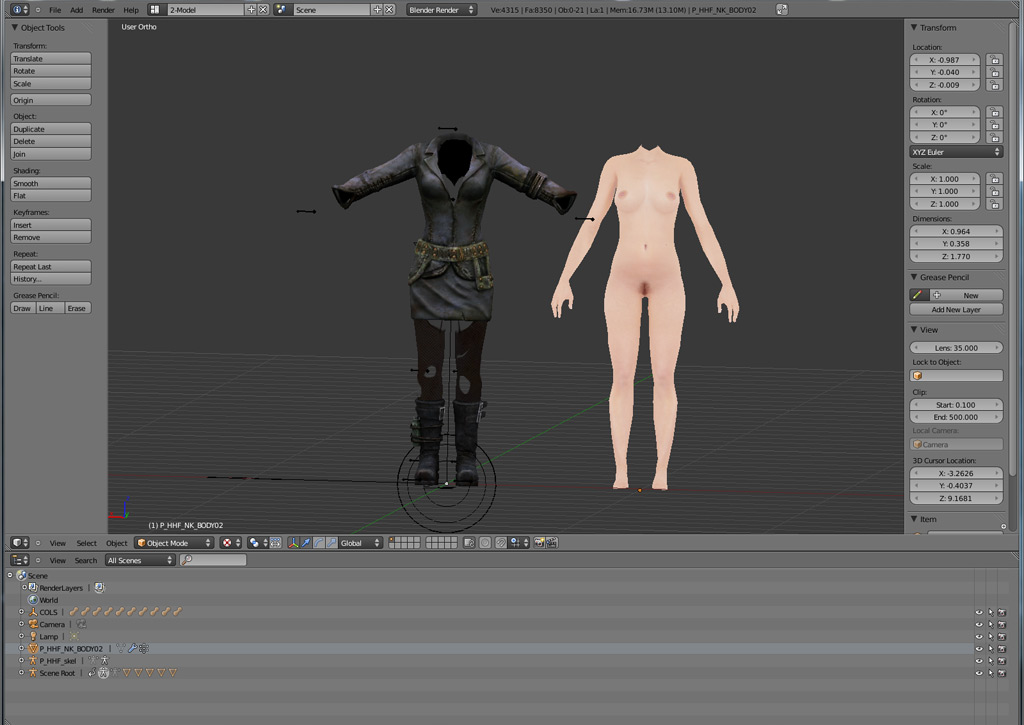
Ahh... my favorite topic. Vertex weights or lolwut? Okay, seriously... I have a basic understanding on what they are - they handle how much the mesh is affected by bone movement... so if you move the right arm bone upwards, the mesh of that right arm should move nicely along while the left foot doesn't move at all. This is what I understand. Now... when I switch Blender to vertex paint I get this:


Yup. So... I can paint a question mark there and that's all that comes to my mind in this mode. I understand that in theory I should tell the body mesh how much the movement of a specific bone affects it. But HOW I do that here, I have no idea. Or... how could I see existing weights? I mean, this mesh is already rigged to the skeleton below and moves with it (this is the Jester model), shouldn't that mesh already be colored like a rainbow? Where do I choose which bone I want to paint weights for? Or am I just in the wrong mode and should switch to Weight Paint...


Which is exactly the same problem in blue? I'm sorry, but this is where I'm totally lost and think I'm too dumb.

"Then I marked seams on the mesh and unrolled it to get the UV map."

Got the idea of it, I guess it takes some trial and error but I understand why and how (might have to google the exact steps again, but anyway).

"Edited it to make the best use of the texture space."

Now how to do that is a different topic, no idea how to edit that UV map... inside Blender? Can you move stuff around on the map and the model later still knows what you did? I'm far from those steps yet, so we'll see.

"The baked the diffuse texture, ambient occulusion and normal map from the high poly model to the low poly model. This captured all the muscles and features in the high poly model."

This would probably a whole new chapter of the walkthrough I need. I get the idea of using a high-res normal map to make a low-poly model appear smoother, but how...

"Saved the textures, combined the diffuse and AO in GIMP, saved as .dds."

Not sure about the whole AO map and combining it with the diffuse, but I guess that's a topic for much later. Saving something as dds, that much I learned already! Yay. 

"Reduce the alpha value of the normalmap in GIMP, blurred and smeared out any baking artifacts. saved as .dds"

Same as above, not sure about the alpha value thing, rest makes sense. 

"Set up the material in Blender, deleted all unnecessary meshes (the high poly ones), checked it all looked OK."

I just have to mention what a major pain in the rump the setting up of textures in Blender is. I only get that done accidently, never exactly knowing what I do.

"Exported to mdb. Done..."

Well, I tried that before, just for the laughs... 


... but then found out it's probably because I deleted everything that isn't the mesh, like the collisions (no idea what to do, how to deal with collisions)


"NIF usage:
To use .nif meshes the big chunk of work will be reskinning - the
skeleton used in NWN2 is different to the Fallout 3 one. There is a
script in Blender 2.49 that interpolates weights from one mesh to
another, but this doesn't work in 2.56. I mean to update this as well
because it's very useful."

I think this is the Bone Weight Copy script I mentioned before and already installed in a version that works in 2.6. How exactly to use it is another question. I assume I should put the two meshes (say, a body and a shirt) as close to each other as possible )like the body wears it), then select both, then run the script, and it should translate. However, same as above with the manual painting: How do I actually check if it worked, where can I SEE the weights, where can I make my adjustments? That's the part that is too much for me, and I bet a model that doesn't fit the other mesh as nicely as a catsuit will need a lot of adjustments.
The most helpful thing I could google for that is this TES tutorial. Sadly it's not explaining most of my questions and is also for Blender 2.49 which is essentially a totally different programm....

"LO1/LO2 meshes:
These are lower poly meshes that are provided in the NWN2 .mdbs. They are meant to provide lower poly models to be used if the object is a long way from the camera. In practice they are not necessary. I've tried to understand what makes the engine use a low poly model but can't - I think that at high graphics settings it just doesn't bother. These meshes are not necessary and can be removed. None of my models have them."

Never heard of 3DSMax people deleting those (I've looked over some 3DSMax tutorials hoping to get some pointers), but from what I know from using his stuff he's probably right, everything works without them and it probably saves me a lot of extra work and headache ignoring those.

"You do need the COLs - these objects are used to store the collision sphere info from the .mdb. Don't try and edit them."

Which raises the question, how to deal with them when I made a new mesh? Should I... somewhat... assign them to it? Should I, say, position the new model into the exact same postion as the old one so that, uuuh... those collisions keep working? I have no idea, these collisions confuse me, I only know I accidently deleted them way too often. 


"General points:
Always model in quads. This thread is useful:
http://blenderartists.org/forum/showthread.php?t=93651
Let the export script triangulate it for NWN2. Don't worry too much about poly counts, graphics cards are much faster than they were five years ago. Do try to remove unnecessary faces, have enough to get your meshes profiles looking smooth. Having too many faces near joints will look bad because the NWN2 skeletons don't have extra 'joint' bones to prevent the joint squashing (You'll see what I mean when we get to rigging proper)."

I almost missed that last sentence there, which might explain my problem with the Make Human model in the last post (armpits). So reducing the vertex count down below the arms could help if I understand right? Something to try. 

"The export script doesn't handle relative paths correctly - make sure you have specified your texture files with absolute paths. Although Blender can read .dds files it can't write them. Do the UV and texture last. Get the mesh right first."

Dunno what that absolute/relative paths is about. DDS thing is clear. Doing UV and texture next year as it seems anyway.... Hoping to get the mesh right until then.


Well, so far for this walkthrough... I hope Jester doesn't mind using his quotes here, but I think this serves well to illustrate my problems.

Learning 3D stuffs, part two: Getting started

Part 1 is below

Now to the part where things get really messy: Importing and starting to work in Blender.
Sadly this is probably where most misunderstandings occured in the past when people like Jester tried to give me some hints - the problem isn't really how to import or sticking to NWN2's specific conventions (well, once we get to exporting that's not quite true), but the main Blender workflow itself that most people who have experience in 3D apps take as given, like "then just paint the vertex weights..." - lolwut?

Well, let's start with the things I have covered already. Import.

Importing a NWN2 mdb works. I'm using Jester's nude as a base here because it comes with everything I need and armors can't be slimmer than that. Importing with the standard settings + "find amature" I end up with this:


Just for the record, I also managed to get textures in somewhere in the past and even on this import they show when rendered (F12), but that's another topic. So what I have is the main mesh and an amature to work with. The amature is actually not the NWN2 skeleton, only a replacer to give you an idea where what is. Posing this or making changes to it is no option if I understand correctly, you can only use it to make sure the mesh fits it as good as possible. So much for mdb files, let's hop over to Blender 2.49 and .nifs:


Again using the default settings for the nif imports, I'm ending up with a model that looks quite okay for now. Note: I'm only using this one for testing, I only plan to convert content I'm allowed to convert ;) ). But, if you compare the picture with the mdb import above, you should already see a difference - the pose. A comparison pic from an older post:


So the main problem with all the new models is getting them into the same pose as the NWN2 skeleton. And booooy, that's where the trouble starts. I'm not even talking about making it fit exactly already, only about... lowering the arms?
The .nif model for example comes with no skeleton... or rather, there's some sort of amature included which I can't quite figure out how to use. When I try to move/rotate/etc, I get....


So. And that model should fit the base human mesh from NWN2 some day? I don't see that coming... I assume I have to make a new amature, and paint new weights... which, frankly, is only sentences I have picked up while reading the webz, because, hell I have no idea how to start with that.

What I know so far from resources like the Blender Noob to Pro is basic manipulation, I know how to grab, move, add verex points, edges, faces and cut them off, I also can scale bones... but that's it, and learning even that is very hard in Blender because it's the damn most unintuitive thing ever. I'm no computer illiterate, I learned the toolset, Photoshop, whatever, but.... this? This is rocket science. Anyway, rant over... switching to Make human now because the problem there is similar and yet different...
In make Human I created a slim female figure I'd like to use as a new base (I know people start with easy things usually, but I'm not interested in creating a new barrel for NWN2, I want to work on what I really want! ;) ). The big problem is that you can't pose in Make Human, but you get support for that in Blender. I export using the usual settings and import it, scaled to 0.13 which is the closest I can get to the NWN2 model. I end up with this:


Not too shabby, isn't it? The problem is, even though it comes with a skeleton and already set up for posing, actually posing it is much harder than I thought. Some rotations are completely impossible, like turning the hand. I found it almost impossible to come even remotely close to the NWN2 mesh. Here's what made last night:


Left you see the NWN2 model, right the Make Human. Yes, I managed to lower the arms, but it looks already less natural than the NWN2 one, even though the mesh is of a much higher quality. Look at the hands, I can't get them into the same position (important later for gloves or bare hands). And I can see the exact same problem coming with any Bethesda models too, all of them, even if I could manage to pose them, would be very hard to pose in detail. Details like... the Make Human skeleton doesn't even have all the finger bones, just one for each finger where the NWN2 skeleton features every knuckle (you want to make a fist later to hold a weapon, yes?).
Another issue is the heavily deformed mesh once you start posing things in Bender. Take shoulder and armpits...


You don't even see it that much here anymore because the arm is too low, but if it's at say... 20 degrees more upwards the armpit looks ridiculously deformed. The shoulder already looks absolutely unnatural. This is the problem with posing in Blender. If you compare it to Jester's base (posed in DAZ), the result looks much better:


Pity the DAZ body isn't to my liking and you can't pose the Make Human one in DAZ... anyway, you might say "who cares for nude bodies", but the same problem will probably occur with .nif models too (if they were even posable in Blender), I'm not looking forward to it.

All this is still very basic stuff. I've not talked about cutting heads off yet etc, but I managed this. Where it really gets over my head is the posing for one, then the whole "rigging up to NWN2 skeleton" thing which is absolutely mindblowing for me. But as you can see, my problems already start long before that.

To be continued.

Learning 3D stuffs, part one: The setup

As I said in my last post, I'm always looking jealously over at the Bethesda community which seems to put out hundreds of new models every week with ease, a lot of them armors or body replacers of high quality. The NWN2 community started off with quite some enthusiasm years ago too, but seems to have died out when it comes to nice clothes etc. Unacceptable! So the only solution is, trying it myself. As long as it's just retexturing of existing models, no problem, I have figured that out myself, being familiar with Photoshop and having learned the basics of file conventions in NWN2. But where I'm completely lost is the 3D side of things, actually doing stuff in a 3D app.

As some sort of reply to, say, Jester's helpful mails last year, the few tutorials I've found and Frank's comment to my last post, let me start with where I'm coming from and where I really get stuck.

As for NWN2 works, what I did so far can be seen in that little hak linked on the right (I still don't get why I have that age restricted thingy there). That is based on Jester's New Nudes (with clothes), basically a collection of textures attempting to suit every race as good as possible.
Furthermore, not uploaded, there's my attempt to use Jester's belt-slot clothes to create some dresses and undies. Example:


What you see up there is actually not a painted body model, but the lingerie is a 2nd model worn as an extra piece of clothing above the main body, enabling you to use any body texture with it (a blue one for Genasi, a dark one for drow etc.). The lingerie model is a piece of clothing worn as a second layer in the belt slot (NPCs) or gloves slot (PCs), based on Jester's catsuit model with most parts transparent. All this can be done in Photoshop alone, along with the regular NWN2 tools like mdb cloner, nVidia plugins for Photoshop etc. etc. And of course existing models, which is the tough part.
The problem is that I'm stuck with the basic shapes of those models, so a, say, dress with puffy arms, certain skirts etc. are not possible. Also, to get a bit more into detail, my undies like that up there look incredibly 2D, like paper cutouts. You can fake some structures with normal maps, but usually the seams never look convincing. To add actual volume, you need a model and edit it in a 3D app.

Anyway, this just to sum up the following: I'm familiar with NWN2 content and naming conventions, know how to use mdb cloner, know the basics about texturing in 2D, can edit 2das etc. etc.

Now let's get into 3D, because this is where I feel like a 3 year old....

Starting with my setup. I've collected most tools needed to import, export and edit both .nif (Bethesda) and .mdb (NWN) files, plus some tutorials:


Missing in that pic are of course the NWN2 toolset, standard tools like mdb cloner, NWN2 Packer and stuff I use for other things too like Photoshop (Elements and CS5 on the Mac side). I also have Gimp in there for some specific functions - mostly to follow a Blender tutorial, but there's also neat things like a "make seamless" filter to quickly create texture tiles, which requires a bit more work in Photoshop.

Where things already get messy is the basic setup of Blender and it's plugins: Certain plugins ask for certain versions. That's why you see both Blender 2.49 and Blender 2.62 in the folder. Finding out the right combination was already one of the most frustrating parts:

- 2.49 is required for importing/exporting Bethesda's .nif files, because the niftools haven't been updated yet.

- 2.62 is for the rest, including the .mdb plugins which have been updated. I also prefer using this version, and the two look so different that it's almost like learning two different 3D programs at once. I prefer to go with the newer version and only use 2.49 to import a .nif and save it for using in 2.62 later. After all I don't plan to export a .nif again.

Having both versions introduces a new problem: You have to change the install paths to get them both running at the same time, otherwise 2.62 overwrites the 2.49 content.
Also, what barely anyone tells you, stick with the 32bit versions!!! It took me a long and frustrating time to find out the 64bit version will only result in much more headache when installing the plugins.

Now for the required plugins:

- Niftools: Install only exactly following this post - No experiments. A 64bit version or a different python download than linked there will screw everything up. Don't try the alphas for newer Blender versions, screws things up too. Stick with the regular downloads and Blender 2.49.
The only exception - you can (additionally) use the latest release candidate of Nifscope, only this will enable you to get Skyrim models into Blender (a different topic for later, haven't tried it yet).

- mdb plugin: Not half as much headache installing it than the niftools. Works with the latest Blender release, as long as you stick again to the 32bit version all is fine. Remember you have to enable plugins in the User Preferences -> Add Ons of Blender before you can use them.

Additionally, as I've read in many places, Bone Weight Copy should make things much easier. It was included in past versions of Blender, now you have to find it again on the interwebz. Funny, the name of the original author sounds somewhat familiar.... <_<

With all the Blender stuff covered, maybe a few words on the additional stuff in my folder.

First we have the DAZStudio, which was a free download during February. This is almost exclusively for making human bodies (or clothes) and posing it. I was quite excited to get it for free first, but I'm a bit less excited now. I don't really like it. I wanted to use it for making a new base model that looks a bit more natural than what's available currently, but hell, they even want you to BUY the nipples... hahaha... I used Poser a long time ago, which would be more useful for that task. The big pro argument for DAZ is that you can actually pose the figure, a topic I'll get to in my 2nd part.


As an alternative to the above, we have an Open Source app called Make Human. I'm using the latest Nightly Build because it comes with quite a few new features not available in the stable one yet, and it works fine.
For making a base body I'd actually prefer this program by far over DAZ. Because the body looks much more natural (based on full body scans), you can make very believable fat/anorexic/etc persons and, well, it's not a biggy, but you don't have to pay extra for nipples (etc) too.


One of the big Pros of this program is that it has a very smooth Blender export, Blender actually comes with a Makehuman plugin by default and you get a posable, rigged, neatly setup model from Make Human into Blender with just a few clicks. Theoretically, because there are issues I'll mention later. One of the real big issues in this program is that you CAN'T pose yet. This issue is so big it almost ruins things completely. You can pose in Blender, but.... later.

Well, so much for the basic setup. You can also see some documentations in my folder, some from tips from Jester, some Blender tutorials, release notes. Hexagon, Bryce etc. are of no importance for NWN2 now.

Finally, there's also gmax in there. I don't know much more about gmax other than it's free basic version of 3D Max, fairly old, but should have enough functionality for NWN2 modelling... I haven't looked much into it yet.

To be continued.

Monday, February 20, 2012

If I had the skill: My long wishlist starts here

Time to move that stupid EA post down a little and post some pics again, even though they're not mine.
Current problem: Since playing Skyrim I have such a need for custom content for NWN2 again! I want more, and I'd love to be able to do it myself, but I just can't figure it out.
I really don't know if I'm that thick... I mean, I did computer stuffs for years and studied graphics... what is it that I just can't get into 3D proggies? Am I getting too old?

Last week I installed pretty much all the DAZ stuff that is available for free during this month (grab it if you're interested!), but it didn't really help at all since my main problem is still the import/adjust/export procedure with Blender. At this time even the installation of the required plugins and finding the right version is getting more and more confusing, I didn't even get as far as in my first clumsy attempts. What pains me so much is knowing that other people have zero problems with it and all I want to do should be easy for anyone who UNDERSTANDS THIS CRAP! *sigh*

Anyway, I've collected a lot of things that is on my personal wishlist just for a simple conversion of the base models. Highest on the list is of course armors and clothing, that's where I'd start. I know animations are hard stuff even for the skilled ones, so that's nothing I even think about at the moment. Models might be easier than armor, but there are no urgent needs for any specific ones (other than my NWN1 ships... *waves to Hellfire* ).
No, clothing is something I'm a sucker for, anything that improves the character looks. And sadly, the input of such on the vault has stopped long ago. But often I stumble over a great model on the Nexus sites while looking for New Vegas/Skyrim mods and think "damn, it's there, it just needs someone to do it!". I'm not even speaking about the gorgeous ingame stuff I'd love to see, but I'm scared of running into legal issues when grabbing Bethesda's official stuff so usually collect things from other modders in my link list.

Long story short, here's a bunch of stuff I'd loooove to get into NWN2. Some might not look so great first, but textures aren't the issue, I know how to use Photoshop etc. No, it's the meshes I want, either with the original textures or just as a plain white base for doing my own stuff.

Now the prettiness of my hitlist part one - all pics are from the Nexus sites and the original authors:

1. Triss armor. Maybe the prettiest of all. Has to be scaled down on polys, but hell... I'd love to get this! 


2. The RoadStroker's Rogue outfit. Was my favorite before Triss' armor. Here in the FalloutNV version, the original was for Oblivion, Skyrim version exists too. I managed to import that into Blender at least, ha... ha... *sniff*


3. Blue Stripes Elite. More from the Witcher, now with love for males too (yes, I do care for male outfits, those are just even more rare).


4. The Witcher 2 models (various). Still not the last of the Witcher 2, that content is just good. Cudos to CDPR who apparently gave their okay. 


5. Captain Molly For HGCE: Huge jump back in time to Oblivion days. This would make a great outfit for NWN2 too. The textures certainly need to be redone, but a good base for nice outfits!


6. Summer Fashion for CBBEv2: Some more revealing but not lore-breaking or ridiculous outfits, prefer this by far to modern skimpy stuff. Not all, but I'd like to have a few.


7. The Witcher 2 - Geralt Light Armor and Witcher Swords: You saw it coming, didn't you? The Witcher in person, or rather, his outfit.


8. Scout Armor: More love for males - an armor I just stumbled over, apparently an original. Would be nice!


9. Get Married in Skyrim in Style: A rather simple base, but nevertheless good base for many medieval dresses. 


10. Ashara Romantic Outfit for CBBE: Another simple but pretty base for all kinds of experiments. Not very medieval, but you can probably do a lot of texturing experiments on this.


11. Underworld Armor: One from Oblivion, kinda neat! 


12. InStyle Welchy's Culinary Desire HD Chef outfit: Another of these simple but pretty and useful ones.


13: Noble Female Clothes Non-replacer: This would make a great base for all kinds of new clothes! 


14: Feuermagierrobe: Apparently a model from Gothic 2, but looks good!


15. HGEC Bare Shoulder Dress: This pic might look not as impressive as the rest, but with a new/improved texture I'm sure it's a great base. 


16: Triss from the Witcher 2 Companion: Actually, I want her hairstyle! Maybe the head too, but the hair would be great. :)


17. Fur Hoods HD: Rather simple maybe, but Skyrim, Fallout etc. Had a lot of great hoods, I could grab a dozen of them. But since we're only looking at community stuff now, here's a fine example.


So much for now. So who gives me a real step-by-step guide for doing this? Or just grabs all that stuff and converts it for me? Hmm... I knew it!

Tuesday, March 8, 2011

'tis so frustrating....


The mysteries of 3D design. I can't describe how dumb I feel when I look at any 3D design program. Long ago, I mean, really long ago, I learned some basics of Cinema 4D at my art school. "Learned" is a little bit of an exaggeration here, I managed to import some models and combine them to a scene, and that was it. In the meantime of course I forgot even that again, and it doesn't really matter anyway, because Cinema 4D is probably the least commonly used program for what I'm attempting to do. So far I've only seen it at advertising companies, used by artsy Mac-Users to design toothpaste tubes and boxes for ads. Fascinating.

No no, the whole world out there uses the Autodesk products, and mainly for game stuff you actually can't avoid 3dsmax. I have absolutely no clue whatever to do with such a thing, and it's a bit hard to get my hands on it too, given the ridiculous price. 30day trial you say? In 30 days I might learn how to navigate inside a scene, but surely not how to do the stuff I want to do. Okay, scratch that.

There's also Blender. Blender is actually an incredibly powerful tool, it's free and can do pretty much everything the other big players can do too, as it seems (see movie still above), at least for my needs... but... Jesus Christ, I'm crying like a baby once I look at the screen. What the hell are all these things for? This is nuclear physics, no less.

Okay, paddle back... Why am I doing this? Because I'm sick of hitting walls in my attempts to make some custom content in NWN2. "Make" is a little bit much, I'm mainly just retexturing things in 2D. It took me an eternity to get the basics of NWN2's normal maps, alpha channels in texture maps and all that already, but I managed, at least I was able to make my reskins for Jester's nudes and create some undies for them by manipulating textures of preexisting clothes. But I'm hitting a wall. Some things I totally want to do are just not possible with the models I have access to, also, some texturing work never turns out to be satisfying, mainly due to doing normal maps not in a 3D application or having a too plain base.

Often when I have no inspiration for Middleforest like now, a little custom content work got me back to it. You know, having made a nice new outfit you want to see it in game... you open the toolset again and load the mod and think 'ah well, now I added the blueprint, could as well make a new shop'.
Well, lately both Middleforest and custom content were more frustrating than ever, everything I did was pretty ugly. The module scares me off with all it's details that don't work, and with clothes I hit the said wall where it's no fun anymore. Mainly because of the lack of model bases, and me being horribly scared of 3D stuff.

Okay, after a long time of avoiding it I thought I'd at least give it another try, if only for converting stuff from other games. I tell you I have no clue what I'm doing, one day was already wasted on getting Blender and the import/export scripts to work (wrong Blender releases, wrong 32/64bit version, wrong install paths, outdated scripts, etc.). Inspired by a sour comment of Mr.Nixon on his fallout blog, I thought I'd stubbornly try to get an outfit from Fallout to work, actually a splendid idea because there are so many outfits and other models at the Oblivion/Fallout Nexus vaults that just wait to get used.

Using two different versions of Blender (older, stable 2.49 32bit for using the .nif import/export stuff and a newer 2.55 64bit - 2.56 is again unusable - for using the .mdb plugins... headache anyone?) I was at least able to get everything into one scene, and with some pointers from Jester's tutorial included in the .mdb plugin, even managed to apply the textures. Hooray!


So... here we are. I have a body base from NWN2 (that's one of Jester's) and a nice outfit from Fallout 3 right next to it in one scene. Hooray. Uh... what now? Yes, that's it. I have no clue what now. I probably have to... make it fit, combine somehow with the Fallout outfit fitting the base nicely and making use of it's skeleton... avoid clipping... uh... clean some stuff up... uh... figure out how to control polygon counts... I... I have just no idea what to do.

At this point I'm again wondering if I should use a 30day trial of 3dsmax because apparently everyone knows how to use that one. That they know does absolutely not mean they are willing to share though, let's face it, the few people in NWN2's community who are skilled in 3D are locked away in their ivory tower and only sometimes throw an awesome model out of the window down to us mere mortals. No bad feelings, they are busy with the serious stuff... just saying... :)

And 30 days for all the stuff I'd like to do? Can I even save useable files? I have no clue... mastering Blender is a dream, oh my god, what could be done if I had any clue what I'm doing in this... (at this moment it takes me 30 minutes to find the right button to change the view). Or... just forget about it, drop everything because I'm just too dumb to use this?

*cries like a baby*


Edit: Oh, and Happy Birthday mom.

Tuesday, January 18, 2011

Custom content, LOTS and LOTS.

Have we all survived the winter so far, yes? A while ago I actually thought I'm a winter person, lots of thoughts and inspiration during the dark season. In fact though, I couldn't get myself to even open a single area during the last month (good riddance, December) and spent most of my time with long rants, as the blog proves. What I managed to do though was updating some haks and cleaning others, and only now I'm actually starting to make use of the new stuff.

Speaking of that, and my older post about autodownloader problems, I need to rant a little again. When you read through the various Persistant World-related posts at the Bioware boards, one of those things you constantly hear is that you should go with the times and use the autodownloader-ready haks from the vault as is, so players don't have to download the same content twice. Sounds fair enough, but the reality looks more like builders having to manage a neverending list of haks (who wants to assign, say, 72 individual haks to their module?), having to find out which content overrides which, and if the next of tiny hak #57 update won't conflict with larger hak #62 below. If it does and, say, a new model in hak #57 suddenly overrides that awesome model in #62, it's time for fixing. But hold! And that's the problem number two, you can't fix the original hak, you need to pull the content up into a custom hak, because the next time the autodownloader is used the fixed hak would be overwritten again...

And that's the next problem I already ran into sometimes... a good example is Heed's PC Tools. The original hak has a bug, and there are two different fixes for it. One is a fix within the hak itself, the other is a fix in the script. Now, both fixes seem to work, so some builders used the hak fix, the others the script fix. The result is, if you go server hopping, chances are good the PC Tools are downloaded and replaced over and over again, or even worse, if you come across a server that doesn't use the ADL, players suddenly can't use their PC tools there anymore (because they played a different server before) and can't figure out why. It took me a long while too to figure out why all of sudden my PC Tools in Middleforest stopped working, even though I was sure I fixed them... after a long time I remembered being serverhopping and found out I had a different version, but hell, that took me some days. Anyway, fixing these things is a major headache because more often then not you first have no clue why things suddenly go wrong, then you need to track down the culprit.

Next thing is, bloat. I shouldn't really rant about bloat, given the size of Middleforest's current hak set (it exceeds old 3C). However, that doesn't mean I just grabbed everything fancy out there and made a giant compilation, no, I DO care about the content and it's quality. Some of the largest haks I use are armor compilations for instance, and a huge amount of outfits in, say, Aleanne's or the Always Summer clothing haks simply neither fit the setting nor do they meet my quality standards anymore, they are bloat. I recently cleaned up all the clothing haks and was able to reduce the size by over 300MB, plus making room for other outfits again.

Last but not least, I do believe that a 500MB download or even a Gigabyite (hey, I'm not there yet!) is not too much for a PW anymore. These days kids download Gigabytes of Free2Play games all the time only to install them once, try them out and delete them again. Singleplayer modules are a different matter though, if I made a singleplayer game, I'd carefully choose every single model and only add what I definitely need in this or that scene. For a PW project though, I think it's important to have a good base which gives you much of building freedom right from the beginning, because you intend to use it much longer. A PW admin doesn't try to attract players for a single quick playthrough, but for a long-time game with an open end. I think players who are really interested in a certain Persistant World understand that and don't mind a single huge download, especially in times of terrabyte harddrives and broadband interwebz. But massive hak changes later, while the server already runs, that's much more painful.

Anyway, that's why I decided for a custom Middleforest hak set. Mainly because I don't have to manage more than a dozen haks, because I know pretty well what content is where in case of trouble, no sudden hak updates that break something, and because I can decide what of a hak's content I want to use and what not.

Moving on to what's inside the haks. So, why has nobody ever told me that there's a NWN2 conversion of one of my favourite NWN1 tilesets at the vault? Tsk. Now that's one of my latest additions, and even given it's higher fantasy content, I must say I'm quite pleased with how good some of the buildings fit into Rungholt's elven quarter (and not only there). I love Tupoun's City hak, but as nice as it looks, a whole city only built with it doesn't offer that many surprises anymore. That's where the CODI buildings can really make a difference, I think.


There are some minor problems with them though, that's why they need to be used with care. First, they are not tintable. Not such a big deal because the City Hak buildings are and can be adjusted to match the CODI buildings. The next, bigger problem is that the buildings apparently don't block the line of sight, which can lead to game mechanical issues. There's also the point that they don't fade the same way as the NWN2 buildings, I'm not sure if that will lead to big camera troubles or not - in the toolset it was a little strange though because they fade out at some angles and I'm always scared I accidently deleted one... anyway, still a wonderful addition.

The next thing that kept me busy last weekend was skyboxes, and that's not a success story. Initially, I got very excited about them - they are very easy to make technically, and Google helped me to find some panorama skies that look great in game.
Before you know-betters ask, no, it's not the fact that Obsidian decided for some utterly silly double-image-wrapping thing... what's that, the non-know-betters ask? Oh, the image is used TWO times on the skybox in game, so if your image has a sun or moon or tower or other landscape feature, it'll show up 2 times in game, once in front of you, once behind. Yeah, silly. It's okay with a mountain, but not so much with a sun. However, no, I found images that work well enough.

No, the big big problem is that the stupid skybox doesn't change in game. You might have a skybox option in every single day/night cycle stage, but nuh-uh, if you want to use different skies for different times of the day, forget it - the game only uses the default one. That's not the worst, the worst is that the game has no options to actually darken or brighten the image, so if you have a bright blue sky picture during the daytime, you'll have the same bright blue sky picture during the night. Bye bye immersion.

As you can see below though, I found a way to darken the scene during the night still. It doesn't look like midnight, but at least like nightfall, say, 9pm. But, this is only made possible by using the bloom options and lowering them a lot. That means, a player who doesn't use Bloom doesn't see any of it and still faces a bright sky. Plus, lowering the bloom options that much not only darkens the sky, but every highlight in game, including all light sources like torches, fires, the nightvision effect. Long story short, it's unusable for a PW, a weekend wasted. Anyway, just to show you what could've been:


Yeah, I shed a tear about that... the default sky now looks so terrible to me...

A last thing I found at the vault recently is not a hak, but some scripts. Thanks to my excessive Fallout playing, I grew fond of the idea to have a realistic resting system that, doh, uses beds. Yeah, no "I feel so exhausted, let me kneel down for 10 seconds" anymore. Na... I like the idea of having to look for a nice place to spend the night... a free bed, a rented bed or a simple sleeping bag. Additionaly, (I admit I got that from an adult mod in Fallout, but liked especially that functionality) I want to animate the process properly. Not just click-rested-done, na, a proper animation has to go with it. And, if you use a sleeping bag in the wilds, the chance to get disturbed by a thug.

And hooray, it's already been done long ago by Patcha! Isn't that nice... now, the problem is, Patcha's system contains a little too much, I only want some of the basics really. I know many players cringe when they hear "bedroll", the first thing coming to mind is HCR with the mean resting restrictions. I don't want that, I'm no friend of rest timers, rations, partial or no spell/feat/hitpoint refreshment and all that. I just want something more immersive than kneeling down for a few seconds, that's all. Anyway, yeah, that's the plan for the near future, I hope I can use Patcha's scripts as a base for something more simple and convenient, however knowing myself I'll cry for scripting help again as soon as copy and paste won't do it anymore.

Well, so much for now, as you can see I haven't given up building completely yet.

P.S. I almost forgot, after all my Fallout tallking lately I must point you at Mr. Nixon's project here. Looks awesome, I'm sure I'll keep an eye on it.

Friday, November 26, 2010

Rumors of my demise have been... etc.


(warning, post contains mild pixel nudity)

Ha! Thought I gave up, didn't you? Well, I won't do you that favor yet. I don't want to say I was terribly active since my last post, but I did a little more than it might seem still. Not everything, or let's say, as good as nothing of it I considered worth a blog post yet, though.

When it comes to area building, I reworked a lot of the existing ones, but you wouldn't see that on a screenshot. For example, with a bleeding heart I split up Rungholt into 4 quarters, because it just seemed so unplayable to me as one giant area. And, it's not half as bad as I feared. However, the performance gain was only half as much as I hoped for too, so... well, that's one. On screenies it still looks the same as before.


I made interiors too, a whole start/introduction base. I'm quite proud of it, but you know how interiors are, they look boring on screenshots, so I didn't bother.
What else... loadscreens. Expect a lot of forest loadscreens in game. Again, no screenies, surprise surprise.

But now, with some screenies that might make some of you literally facepalm, a huge timewaster project of mine lately - the evolution of my nudie stuff.
Oi, you might say, silly Casa, that old pervert, only has nekkid elves in mind anymore.
Wait! It's not that easy. And first and foremost, it's not about nudity, it's about clothing. So let me try to explain my old skin project again, because now I've made a lot of progress with that.


The point is, there's a lot of custom clothes for our characters and NPCs over at the vault, clothing haks almost everyone uses, like, say, Chimneyfishes Always Summer. You know the kind, short dresses showing a lot of skin, some look a bit silly, some are actually quite nice and useful. All of them have one thing in common, they are based on a nude skin, Zylch's Nude.

So, let's keep in mind: Nude skins are not only for running around nekkid, nude skins serve as a base for all those clothes that show a bit of skin.

Right, next step. There are a few problems with this base. First off, it's a bit old. I know, I'm nitpicking, but the quality of Zylch's base is really not up to date anymore. Edgy, low polygon, and very washed out textures. That people who made clothing textures on the base re-jpg'ed the skin over and over didn't help too.
Then there's the problem with some personal taste, like, let's say, a skinny elf girl might not want to carry around those huge bombs... you know. Not to mention the male base by the way (yes, that exists too!), I won't lose another word about it. So, first problem: Quality.


Okay, you might say I don't care for the polygons and washed out textures at all.
But the main problem I've had with all these clothes is: There are other races than humans in the game. Some of them don't have piggie-pink heads. Some of them have blue heads. By default, not by the skin tint you apply as a player on character creation. So if you make a Water Genasi and equip one of those nude skins or skimpy dresses from the existing haks, that looks crap. Totally. You can't tint the ugliness over, no way. Please see the screenshot of the Yuan-Ti further below if you still don't know what I'm talking about.


I know, many people don't care, they claim they started with text-based adventures in the mid-eighties and don't look at anything else than the chatbox anyway. Well, I like eyecandy and some sort of immersion, and I like the head of my character appearing to be somehow related to the body beneath. Huff. Rant over. *exhales*

So, what can we do about the head transplantation? Make retextures of every armor, for every possible character out there? Impossible. But... we can start with trying to make at least the nude bases that cover a lot of the various heads.
Still a hell lot of work you say? Yes, it is, I can tell you because I've done it.. even in various variations for male, female, small chest, large, etc... it's a bit crazy, I know. I started with this when Jester posted his new nude base to the vault, a base that exceeds Zylch's in quality by far. Not only that, he also included different variations and a proper male base, so almost everything is covered. Well, besides dwarves, gnomes and halforcs, but that's nothing new, they never got any love before, why would they now? (actually, I'd welcome them and make skins for them right away).

Anyway, Jester delivered a high quality base, and what's even more fantastic, a solution to make new dresses without having to replace/paint on the actual nude base.


Okay, that's the part I was never able to explain to anyone until they could see it in game. So... the idea is, you have the nude skin, plus a base to make dresses on that does not use the armor slot, but the belt model instead.
Sigh... let me try it like this. You make a new armor in the toolset, you choose a nice little dress, done. To add detail, you change the armor parts then, like boots, gloves, and belt. Now, with Jester's base you make a nude armor, and change the belt part to a whole dress that overlays the nudie skin beneath. Where the belt dress is transparent, the nude skin still shows.

So, that solution opens the possibility to make the base of the outfit the player's own custom nude skin, and the whole dress he/she wears just goes into the beltslot overlaying that base, so the uncovered parts still show the original skin color. Ack, dammit, just look at the pictures.

Sadly, it wasn't just as easy as that. The first big problem was, while you can easily make dresses that show up as armorpart: belt, it was impossible to make an actual item that goes into the belt slot. Just didn't work, technical limitation, NWN2 engine doesn't want that. So back to the drawing board, and Jester played around a little and discovered the gloves slot would work. So, finally we went with a gloves slot solution that works perfectly.

There's a second option though, a scripted one: Run a script that changes armor_part_belt to a specific number, like, when the player equips an item. Sounds like the best solution, no? Haha, if NWN2 would actually do that. But no, NWN2 doesn't want to. There is a NWNX plugin that supports this, however, not everyone uses it, wants to use it or has an idea how to set it up. So, the solution for n00bs like me is using the gloves slot.

Anyway, let's illustrate that whole thing now so you finally get an idea what I'm rambling about:

The first pic here is a comparison of the nude bases. We use the greenish elf head here because it shows the effect Zylch vs. Jester's base and my custom skin best. I think you'll agree the quality has slightly improved and it looks more natural, yes?


Fine, this next pic shows how the skin lands in the player's inventory, so they can actually have it too, not just NPCs made in the toolset. I made a big mirror in a bathroom here that lets the player choose between the various options (and there are a lot!). On the left is Jester's default nude base, already looking quite fine, but not actually a match for the greenish elf, as you might agree. A few clicks further through the dialogue and our little elfie has found one that matches better.


And now our poor little elfie is all naked and will catch a cold! We must prevent that and give her some undies!
As you can see in the pic, her undies are just pretending to be a dress, game-mechanically they are gloves and wander into that slot. The nude skin stays where it is and is not unequipped. As you see in the small inventory pic of the character, our elf has it a bit warmer now.


Well, and the Undies are currently the big side project, actually. They take a while to make and I'm still a noob when it comes to texturing, especially with normal maps I'm still fighting a lot. Below you can see a little collection of working test undies I made so far. But don't think it'll be limited to undies, there are a lot of options to make whole dresses with long skirts, suits and whatnot. It just takes time.


And finally, the last pic to convince some that might be on the edge still... I think this comparison shows the difference best. Left is the underwear as it is currently present in... uh.. Chimneyfishes? Aleanne's? Not sure. The poor Yuan-Ti lass looks quite wrong in it. Right is my own conversion of the outfit to a gloves-slot dress, worn over the Yuan-Ti nudie skin.


Phhheeew... that was a long rant. Anyway, yes, this whole thing has taken a lot of my time lately. And a thousand cudos go to Jester for being incredibly helpful in the process. If you like the whole idea, run over to the vault and give his (1) stuff (2) a high vote, he deserves it.


Besides that... oh yeah, I made some areas too. Did I mention it? I know there might be one or two people in the world who are not interested in nudity, so for those freaks, I'll try to gather some screenies of the few (or rather, two - and it even rhymes) exterior areas I made completely new. This first one is, yeah - call me a copycat - a ship, and even a starting ship. It'll probably be the intro to Middleforest. BTW, what made it impossible for Obsidian to make some f....ing sails? Hello? White Sheets? That difficult? Apparently, because they have multiple ship models, but no sails. Well, a creative builder taught me tapestries and curtains do the job too, if you don't look too hard at it... Oh, and btw, it has underdecks.


Well, and this one... the screenies don't do it justice, but I'm terribly proud of it. I just wanted to try out the RWS cliffs and somehow ended up with this area. Hope you like it, I do.