Monday, November 14, 2016

Bored!

Well hello out there! Anyone still following?
Tonight I felt horribly bored and suddenly missed my old roleplaying days in Dammendrech. I fired up pretty much every RPG I still have on my hard drive, from Fallout 4 to Baldur's Gate, and nothing really inspired me but one little thing... building settlements in FO4 is kinda fun. But such a waste of time. You can make yourself a wonderful little home and it's just lifeless, nothing going on there... Well, long story short, I miss building. And roleplaying. Both. But for now, building.

If anyone of you talented builder folks out there are still reading this, I've got a question:
I made a lot of areas and other stuff for Middleforest, some of that I really like. But for now, if I really build something again, I'd rather start with something small, some tiny areas with lots of stuff in it, creative building for myself, some NPCs that do something... anyway, I did soooooo much work with my haks back then, tlk edits, whatever, and I can't for my life remember what it all was and how to do it, nor do I want to start making haks from scratch again. I just want to start building.
Sooo... I know some people use loose files in campaign folders for their modules, and that reminded me... wasn't there some way to easily extract or even have the toolset/game "autoextract" only the files from haks that it actually uses? Without me having to dig into my gigabytes of Middleforest haks for weeks again?

Also, if you have a recommendation for multiplayer servers that are still alive, I'm listening.

Saturday, February 14, 2015

Huh? Where did this come from?

2015 seems to get more and more promising regarding RPGs... sign me up for this one too!


Don't forget though, never preorder games.

Sunday, February 8, 2015

So yeah... I have that new blog...

Hey ho... well, my Middleforest project is dead, and so seems to be this blog about it... I didn't really feel like ranting about other games again like I used to, although Dragon Age Inquisition provided a lot of good reasons... But, I kept myself busy with other stuff lately that involves going out and getting some fresh air and all that. So I decided to try blogging about that instead. So if you're interested in rants about other things, like... photography maybe... feel free to keep an eye on my new blog, not much to see there yet but that'll probably change soon.

Tuesday, June 24, 2014

Blergh.

Getting Dragon Age Facebook updates from Bioware, seeing another Emo-Character included as fanservice for troubled teenagers... Bioware won't sell me any games anymore I'm afraid.

And if Obsidian was my last hope for good RPGs, well, yeah, Pillars of Eternity is coming for the real oldschool kick, but instead of another Fallout New Vegas they're working on a World of Tanks-clone now. I'd say my RPG addiction is finally cured, real life here I come.

Friday, April 25, 2014

A little sign of life

Oh, hey there. Quite dusty here.
So, as you might have imagined Middleforest is pretty much dead. Well, it certainly smells funny and my life has changed enough during the last 2 years that I'm pretty certain I won't touch the toolset anytime soon again. I'll be back when NWN3 is out and I'm having another depression I guess. Currently I'm trying to get to Uni (have to pass a few tests, wish me luck) to study something completely different, and I'm really looking forward to that. It might not be totally unrelated to Middleforest, but has nothing to do with game design, design and the crap I did before. Wooo!
Anyway, Middleforest might be dead for now, but there's a little hope that some of it's DNA will live on... I gave the whole module to Cipher and gave him permission to use whatever he wants in his Game of Thrones PW. I hope he'll be more successful than I was, keep a look at his work. Who knows, if I ever get an itch again, maybe I'll plant some trees in his areas or send him a few not lore-friendly naked elves.
As for blogging, I had the vague idea of making another blog, dunno if anyone would be interested. For the last year or so I rediscovered photography again after years of absence (working for a pro-photographer ruined my hobby) and made a busload of concert photos, along with some street- and some amateurish "home studio" photography. All not on a professional level, but I'm having lots of fun and it's a hobby that gets me more into real life and people again. I'm already sitting on a huge pile of pics I personally like a lot, and - a little connection to gaming - I thought about getting in contact with cosplayers or LARPers maybe for some portraits... let me know what you think, it might be a project for the later summer (Gamescom is here in August), if I overcome my shyness and agoraphobia until then. ;)

Tuesday, November 19, 2013

Kudos

Apparently there are still some lone survivors working on new content for the game... I wish I could be arsed to open the toolset again, some new and almost unnoticed stuff over at the Nexus would actually be worth it. But me, ever combine 2da files again...? I doubt it. Anyway, have a look, I totally would've used this stuff in Middleforest.

Lights Pack

Pits and Entrances

Visible Breath Effect

Startled Ravens

Great to see new and really nice stuff again, I hope somebody will put it to good use.

Thursday, July 25, 2013

What could've been

So very very sad. If you've read my rants in the past you should remember my hate-filled posts about Bioware's art and design decisions. So here's what could've been and the only question left is why don't they have the balls to actually do it like that? Sigh.

http://mattrhodesart.blogspot.ca/2013/07/concept-art-behind-scenes.html

Friday, May 24, 2013

The big Casa interview: Missing the role-play fix and other brainfarts


Oh, hello there...  how did you find me in this quiet dark corner? Let me just dust off that chair... oh no, not a cold, just not used to talking much anymore... ... 

So how's your roleplay been lately? Oh? Well, mine... pretty much nonexistant really... your NWN project? Good? Mine... oh... um... chest over there, last drawer... oh yeah, that's dirty sheets and pistachio shells, look on the left... yeah, looks a bit roughed up, doesn't it? Oh! Don't toss that away, it's not a rug but my 3D pro... oh, whatever, just put it in the ashtray there. What I'm up to? huh... let me just get a smoke and refill my glass...

___________________

So, Casa is sad because there's no roleplay fix to find anymore anywhere and the faith in NWN has apparently left finally. "But why is that?" you ask? Hmm, where do I start... Why not start with an interview by my cat? He's watching me all day, maybe he asks the right questions.

___________________

Interview: Dalaigh the Casa-cat
Dalaigh: Welcome tin-opener, glad you found the time to make it from your desk to our couch. First of, let me ask you a basic question: Why did you start creating a Neverwinter Nights Persistent World in the first place (instead of cuddling me)?

Casa.: Thanks for having me on my couch, cat. Well, I started as a player on Persistent Worlds back in NWN1 times and enjoyed the roleplay very very much, however I always thought something could be done about the environments we played in, making them more immersive and role-play-friendly. So as soon as I could finally get a Windows PC (I started playing the Mac version without a toolset and for a long time could only complain about other people's areas) I learned the basics of the toolset and offered help to the people who hosted the PW I played on... 

D.: Make it short, I'm getting bored 

C.: Okay, so I made some area designs, but was constantly unhappy about the limits set by the PW (rules, hak sets etc.), and since not all my ideas were met with applause and praise, I thought I'd make something where only my own rules apply and I'd not have to fight for it.

D.: I see you can't wait to give us more insights on why you just can't play by the rules of others and had to do your own genius thing. Let's start with area design, I know you want me to ask about that and rules seperately because I'm your cat. So, area design... have you always been so picky about that?

C.: To tell the truth, yes. My main concern has always been immersion and truly immersive gameplay, whereas many other builder's and player's concern has been gameplay only and going along the building "rules" for optimal performance. There are some building "rules" for PWs out there most people applied to, while I never liked them and went by the rule "everything's possible as long as it doesn't seriously breaks things", where "serious" of course is always in the eye of the beholder. One example would be the so-and-so many placeables per tile rule of thumbs, or where on the grid to place them... or, so and so many heartbeat scripts or... many of those rules led to boring area design, while I threw together stuff for the looks and only changed it when it broke stuff. Anyway, yeah, I wanted the game to look as good as possible, and as immersive as possible. And strangely all the stuff I build was perfectly playable in multiplayer. Just like very large areas are perfectly playable, depending how you build them... most rules of thumb are outdated or only apply to servers that are almost as crowded as a MMO, which never happens in the roleplay niche. On a huge action PW totally different things matter than on a small roleplay PW, a roleplay world can get away with some pathfinding bugs.

D.: But you never finished your NWN project anyway, so no proof for that. Let's go over to gameplay then, I'm sure you nitpicked a lot about that too and claimed you can do better. 

C.: Yes, definitely. I always wanted to get away from the "I need to kill lots of stuffs to proceed", also rewarding teamplay instead of punishing for it was a big deal - how often I heard "I'm better off fighting alone" or "you're ruining our xp"... bah! The base xp system of NWN is rewarding solo play, so a different form of xp distribution is preferred, and also rewarding non-combat activities and roleplay. I learned very early on that this is possible, witnessed a very good attempt on Vives and totally wanted something like that.

D.: There are other systems for hardcore roleplayers too, like HCR (eat and drink, sleep, fatigue, resting limitations etc.), have you considered those?

C.: I'm impressed how well informed you are about these things, my cat. Considered yes, but not seriously. I like realism, but hate if it's packed into too many limiting rules. Eating, sleeping, all that should be a matter of roleplay only, once role-play is forced by game mechanics it becomes a burden, and playing should be fun. No, I'm not a fan of those hardcore systems, I like having fun and now and then ignore the rules too. 

D.: I did my research. 
The interviewer researching

D.: So let me get this straight, you want roleplay and immersion, but without enforcing it by game mechanics? Do you think you can get away with that? How do you think you can keep people away from simply hacking and slashing away in your world?

C.: By area design and general atmosphere. You have no idea how much an immersive world can actually "make" people want to roleplay, simply because everything else would be unfitting. That said, I don't want to keep people from having some fun now and then, everyone needs to let some steam off or enjoys a dungeon crawl from time to time. Roleplay nazis are no fun. A too strict ruleset is no fun either. I'm all for freedom, as long as it doesn't ruin the experience for others. 

D.: What about the setting, doesn't that define the rules and roleplay too? What about classes, are there roleplaying rules for those?

C.: Setting, yes... of course the roleplay should fit into the setting. As for classes, here we are at the main problem I always had with D&D, I don't believe classes shouldn't be taken too seriously and enforce a certain kind of roleplay that is defined by standard rulesets. Nothing is more boring than yet another stereotype, I hate stereotypes. 

D.: Can you elaborate on that? I know you want to. So you're basically okay with building any kind of character and not roleplaying the build at all? Intelligence 8 and a smartass because stats don't matter? Hardly a roleplayer's approach. 

C.: No no, don't get me wrong, I'm all for playing out your build and stats, but not in a narrow ruleset or stereotypic way. I don't think the classes should matter much, more it's abilities. I like class-less systems, but D&D is not one of those, and actually I also like a certain kind of build "guidance" they provide, however I'm very much for giving people as much freedom as possible as to how to play them out. Some people don't think in class categories, but have a certain idea of a character in mind that has this and that ability to spice them up and make them interesting. All that with roleplay in mind - I'm not talking about cherrypicking for a power build, more like... well, maybe a roleplaying power build. "My character is a badass soldier, but he has a soft heart, so he needs a rabbit in his backpack to cuddle". Take a wizard level for the rabbit, no problem... or, I want to make a charming hippie elf. She's singing and dancing all day and loves nature and has a thing for exotic spices... so, bard/druid it is... see, it's about weird and fun characters, this is what I like to see in a RP world, and I hate to ruin it or limiting a player's creativity by saying "no no, if you take that class you must play it so-and-so". 
Of course, if they WANT to play a class out in an oldfashioned manner, all fine with that, I've seen wonderful examples of roleplay "by the rules". Just, no enforcement. 

D.: Well, that's all good and fine... do you have any other examples of changing the rules to your liking or doing stuff others don't? 

C: First and foremost getting rid of the Forgotten Realms setting and lore of course, it comes with a huge amount of rules on it's own and frankly, I neither care nor know much about it. It bores me to tears. Also, getting rid of that allows me to go more into european and non-Tolkienesqe folklore, at least partly. Second, the black&white alignment system. Nothing good to say about that. 

D.: Tin-opener, this all was another huge advertising for your strange project that so far still hasn't seen the light of the day. Did you notice you talk a lot and do nothing at all? Why is the progress so slow, or should I better ask, will you ever go public with this project of yours or are you done with it?

C.: That's a very good question cat, and honestly I don't know the right answer. I'm feeling a little itch to build almost every day, actually I'm thinking of areas all the time. When I see something inspiring or beautiful I think "wow, that's an idea I should try in the toolset". When I see what content people like Tchos work on, I'm feeling the itch to use it too. But... at the same time I just feel that I've lost all faith in NWN2's future, especially in it's multiplayer, and that it's not worth the effort. 

D.: Can you explain what led to this hopelessness? 

C.: Aside from all the building problems I've had you mean? There are a few things, let's see... 
  • The shrinking community and the overall lack of enthusiasm for the game. Apparently I'm not the only person who's had a NWN depression, it seems to affect a lot of builders, content creators...
  • My experience with Dammendrech and the end of that PW. It meant a lot to me as a RP haven, I think it was a wonderful world that did at least a lot of things right and had wonderful area design, along with some of the most wonderful roleplayers I've ever met. I never understood why the world wasn't more successful - I mean, it lacked some advertising, the autodownloader came way too late, there wasn't much to do for one player alone etc... but still, this world deserved better, and seeing how a PW with so much heartblood in it just failed to attract more players discouraged me a lot. After Dammendrech's end I had a hard time finding an alternative and after trying some PWs gave up. Without playing NWN2 anymore I guess my interest in building faded too. 
  • The fail of the Nexus. I honestly believed that move would bring some fresh blood into NWN again, getting support by the most popular mod site on the net. First it even looked like finally NWN would get some publicity again, but sadly that didn't last long - it didn't help that half of the community felt like supporting the Nexus would mean a betrayal to the NWN Vault I guess. It was never meant to, and it was a publicity stunt trying to get NWN closer to the big modding scene again. That this was not only a fail but actually was met with some hostility was very discouraging. 
  • Gamespy support, which was dropped. The community made a fix, but it still means NWN is even less accessible to new players than before, because they have to find the fix and have the will to use it, which is already too much to ask of most people who just got the game on a GoG sale out of curiosity. If the multiplayer for such an old game with such a small community left doesn't work right out of the box, I don't think any new player would go through the effort to research. It might be a small thing for long-time players, but it was another huge discouragement to me.
D.: So does that mean you're done, you end the project with this?

C.: I don't know, I think I'd never say "it's over" as long as I still have the toolset on my computer and feel a certain itch to build from time to time. But I honestly don't think I should make any more promises or even speculate about a future. At this time it has collected dust for I don't know how many months, and as much as I want to I don't see any future in NWN2's multiplayer. 

D.: Have you ever thought about making a single player module then?

C.: Briefly, but no... First, this is something even harder with my limited scripting abilities. I once considered a conversion of "A Dance With Rogues" because I think I could make beautiful areas for it, but that's too much for me alone. Also, frankly it was never the singleplayer I played NWN for, it has this unique multiplayer role-play experience no other game in this world offers and that hooked me up on it. If I wanted to do singleplayer stuff I guess these days I'd sooner learn the Skyrim toolset, this game REALLY needs better stories - NWN2 has great storytelling from people who are better at it than I am. 

D.: So where do you get your roleplay fix nowadays if not in NWN2? 

C.: Nowhere, and I miss it a lot. It's funny that every shit game on the market these days has a multiplayer mode and that there are more MMOs than anyone can count, and yet there's no roleplay to be had anywhere that comes close to NWN's PW experience. I tried a lot, but there's nothing. Strangely there are singleplayer games like Skyrim that offer everything a good multiplayer roleplaying game should have, like I don't know... countless emotes, useable furniture, shitloads of RP items... just no multiplayer. MMOs on the other hand, you can't even use a chair there and you're constantly overrun by some stupid player mounts. 

D.: That's a very sad tale and I'm horribly bored by it's lenght and all your unproductive whining. Feed me now. 

C.: okay. 

Friday, December 14, 2012

Stop teasing me! Oh, and some music stuffs.


Just stumbled over this while reading Tchos' development diary ---
GOD! How long have I wanted a watermill in NWN2? This is so gorgeous! Beautiful! Amazing!
What a goddamn shame it's from Skyrim and therefore will probably never be available for us. Hey Mr. Mysterious modder, show yourself and make us stuff like this we can actually use! Pretty please? And while you're on it, please do all my custom content wishes for me... ah well, let's start slow.

Another little teaser comes from Tchos himself, I like that:


This video raised a few questions maybe some of you might answer:

1. Do you have any recommendations on free music in a similar style? I was always hoping to find some appropriate tavern music, medieval style, that is free to use. If you have tips on ambient music too, I might be interested - but I'm very picky here! As some might remember, Michael's tip on Arcanum's soundtrack was so far the best addition. If you know of any other free game music in a similar style, I'd be very interested. I'm NOT interested in any Synthie or modern-ish styles though, it must be classic, classy and atmospheric.

2. I was happy to see that old NWN1-style music effect, I also liked the Zzzzz for sleep which I would like to have back too. But I was wondering, does anyone know about flavor text in NWN1's and how to add it?


Finally let me praise Xaltar's Facelift pack again:


I nitpicked a bit about that in the comments, I know, but still... why did it take so long until someone finally did a mod like this that quality-wise goes through the roof compared to the vanilla stuff? I might have some issues with the makeup etc, but still, these heads eliminate the horrible "I have a flashlight in my mouth" problem of the vanilla heads, they look a few years more modern and actually COULD start a wave of new content - because so much else in the game is not on par with the quality of these heads and hopefully some people will say "Hmm, the base armor's texture doesn't work with these heads anymore, I need a retexture...." etc. etc.
I'd say this pack can be a huge advertising for NWN2 (and you should try it right away!). So kudos to Xaltar and hopefully it'll be an inspiration to others.

Wednesday, December 12, 2012

NWN2 is only as dead as the community wants it to be

More devastating news have struck our good old favorite lately (among other games), as most players might've noticed already:

PC Gamer

It always seems to me that as soon as there's a bit hope on my side for an extended life of NWN2 and I feel like building again, something new happens that ruins it all completely.
Fortunately, there's a bunch of really good people on the NWN forums (probably because D&D is a game for nerds :) ) and a community fix is already on the way, one that sounds very promising too.

Now that alone doesn't necessarily justify a blog post, but it got me thinking once more. The NWN1 community, which always outnumbered NWN2's, was so fast in adjusting to this new situation and fixing it with a patch that just on the side works for NWN2 too... but if it didn't work on NWN2, I wonder if anyone bothered to fix it too... the NWN2 boards are again awfully silent.

One more thing that also bugged me all the time and especially lately again is the custom content side of NWN2. I guess that my hope that a NWN Nexus site would revive and spice things up again was in vein, very few new files ever got uploaded that actually got me excited (a shining example against the trend is Xaltar's Facelift pack). What makes me sad though is that I often stumble over teasers... pics on the forums, pics on the Nexus that even show stuff I tried to do myself and failed badly at. Sometimes these are teasers for a PW community, but often they're private modifications or modifications for long cancelled projects. That these little gems are unreachable and rot away on some hard disks is incredibly sad and discouraging, and I really wonder what happened to the sharing aspect of the community, especially NWN2's.

Kamal said in some comment on this blog that he wishes that if I cancelled Middleforest completely, I'd at least upload my areas as prefabs to the vault. And yeah, I would - if it made any sense, because due to my heavy hak customizations oin any other computer without my complete hak set the areas will look like total garbage. That's the only reason I didn't upload them really, because hell, whatever keeps this game alive I'm willing to do. My nudie skins mod isn't that great and I only made it for my own project, but hell, just in case somebody else can use it, I uploaded it anyway. That little fix for dresses - most builders probably figured that out themselves because they're much smarter than me, but since I haven't seen it on the vault I uploaded it just for the sake of giving anything back, as mediocre or silly as it might be.

Anyway, what I'm trying to say is, if you want to keep this game alive there should be some change of attitude, an attitude I see more in NWN1's and maybe Bethgames communities, and that is - please share your little haks, you can never know if there isn't someone who desperately needs it, even if you think it's not worth sharing. Maybe you think it's great and you want to keep it for your future project you've been working on for 5 years already, as a teaser that makes your project unique... but really, if you don't release it this week, think again, I think keeping a great game alive should be the greater good nowadays.

Now I'm trying again to get this stupid Blender/mdb stuff working, oh hell... :P

Friday, November 30, 2012

Oh what a mess again...

As a Mac user I wasn't aware of the absolutely stupid and unreliable Windows backup feature, so moving on to a new computer I'm back at an ancient Middleforest backup from 2010. Well, I considered starting over anyway... blegh.

Wednesday, November 21, 2012

Making an area 1 - YATT from a dummy for dummies


It's winter now and the toolset fingers are itching again, but after such a long time it's not easy to find a start for something creative. One of the worst things in the Toolset for me is hitting "New Area" and then staring at that plain boring grassy default field, not knowing where to start. So sometimes I need a little help, like a random base that gives me ideas. And this post should be a step-by-step tutorial on how to get such a random base, from a complete dummy for himself as a reminder/diary and for other dummies who hate learning new geeky stuff and best get an idea of something by looking at pictures.
Let's grab the YATT plugin for the NWN2 toolset and get some ideas, huh? 

So, YATT has been around for years and some people have been using it for a while, like nicethugbert with his area prefabs on the vault, or Cipher in his Game of Thrones PW (where I first thought "I want to do that too!"). There are some tutorials out there, and a thread on the old Bioboards that explained the usage very well, but I couldn't find that one anymore. So I'll start a new one here. 

Basically YATT is an import plugin that makes you a nice terrain out of height maps. Height maps, that's some Black&White images that tell you where the terrain is deepest and highest, a hole in the ground is pitch black while a mountain top is white, and in between you have grayscales. You can paint those yourself in Gimp/Photoshop if you want to, but I don't, so we let someone else create our map, and that's an external terrain editor. There are many, but I (like most others) use L3DT Standard edition, last but not least because it's free. If you later want to paint your own maps and have a program add erosion and realism, you might want to check World Machine. But I just need some basic ideas and usually get lost too much if I experiment too much, and after all we don't want to forget the actual area design, so I'll leave that out. 

I've been playing around with YATT a bit since then, but never got any satisfying results because back then I never learned how to get textures into it properly. So I ended up with a nice random terrain, but it was all grass and I couldn't be bothered to paint textures on it. Because that's another tedious job. I like texturing, as I like painting, and I have a tablet and learned graphics design and all that, but still... getting the texture base done before going into detail is tedious and no fun for me. And last but not least, as good as you might be, YATT seems to achieve much more natural and realistic texturing if used right.

Now to the step by step guide, and mind you it's very basic and I just learned this myself, there might be better ways and tips and tricks I don't know of. If you know them, by all means let me know! 

Getting started. We need:

- YATT of course. Bookmark the page, you WILL need those numbers you see there.
- L3DT Standard Ed. (I'm using the latest Developer build, but it probably doesn't matter)

You also should very soon decide on how big your area should be. For landscapes like the ones we create here large areas make sense, and don't worry, I have never had much problems with large areas in NWN2. I'll just go with 28x28 in this tutorial, because I was thinking of a large snowy area to get lost in. If you want to build huge cities with many placeables, you might not want to go that far, or if you're really spamming grass like crazy like I often did. :D

Install both - I hope you remember how to install toolset plugins? If not, there's a guide on the YATT page, don't forget to enable 3rd party plugins in the toolset options. L3DT is a simple installer. 

So, we start with L3DT once it's installed. Run it and you'll see a boring grey screen and not much else. What we want is to create a new project under File. Select it and we'll get the wizard.
 

We'll just follow along going with the recommended options for now until we get to the screen below:


This is the step where you can play with settings. To get new ideas, you'll always want to get back here and change stuff just to see how it turns out. Play with those default climates and change parameters for fun until you get either a nice surprise area during the following steps or you get a feeling of what parameters suit you best. Don't worry about the textures, if you make an Arctic region and then think "doh, that terrain would suit a rainforest much better!", no problem, we can change all textures later. Anyway, we adjust a little and then hit next.


In the above screen you see what we need and what not. Just go with me here.


Same here, I have actually no idea what this is all good for, let's just move on and hit okay.


Now you can watch L3DT do it's thing for a minute or ten depending on your CPU. Get some coffee, have a smoke until....


.... you get that above pic. Hooray, a nice minimap picture! But to really get a feel for it, Hit that small 3-D button above for a 3D preview. Hint: Move around using WASD, E and Q to change altitude for a better look, and when you're done hit ESC to go back to the former map view.


Satisfied? If not, just try another one with other settings. Play around, this is the point where we hope to get some new inspiration. If you're finally done, we need those numbers from the YATT site and enter the tedious geeky stuff we don't like (do you?). Look at the pic below, remember we settled for an area size of 28x28 in this examples. Can you tell me what pixel size the height map has to be? And the texturemap?
Right, you knew that the height map for an area of 28x28 should be 265x265 pixels! Because the YATT site told you. Well done! While we're here, also write down that texturemap size below, which is.. yes? Hmm? 1408, good!
So, now we switch back to L3DT and look at all those small buttons above our image indicating what we currently look at. We want to look at the height map, so click that button.


We want to export this map now, a right-click on the map is all we need to get there. Now, let's get serious for a moment, this step is crucial: File format must be changed to .bmp and you have to check resize for export and change the numbers to 265. Save the file in a place where you can easily find it later, give it a name that makes sense (e.g. arctic01_height.bmp or whatever).
If you only care for a base terrain, that's it. But we also want the basic texturing done for us. So, we switch back to the texture map and right click on it, and this time we choose Operations -> Alpha Maps -> Generate maps. We get the following screen which already gives you an idea of what alpha map is responsible for what texture, and you might want to take a note on what NWN2 texture to use for it later, but that's all optional. You can simply hit Next.


Now we get the next geek screen, just hit okay.


We end up with 4 new alpha maps in our main L3DT window. Time to export each one of them again just like we did with the heightfield earlier, BUT with a different size. Remember? Right, we save as .bmp resized to 1408x1408, well done! Save each one in the same place as the heightmap earlier, you can rename or not whatever suits you best.


Now, let's look at what we have. I saved my L3DT project in the same folder too, so there's a bit more inside than just the exports. I marked the files we need, make sure to select the .bmp files, not the .png with the same icon. And with that, we're done in L3DT.


Okay, let's start the NWN2 toolset. I prefer doing my YATT experiments in a plain empty module/directory that is only for YATT and nothing else. Better import a good area into my main module later than being sorry after hitting a wrong button and overwriting an existing area or whatever...
Anyway, start YATT from your plugins menu and go directly to File -> Define Input Images. We're looking at the following image. I'm sorry for it being partly German, but you'll figure it out easily. I marked the two image lists we need with a red dot, start with the height map and click that small file button on the right:


In the next window, we need to add our heightmap we created before. Hit that Add button (in the image below "Hinzufügen"...


...and then on the right side open the heightmap image we saved earlier. And now another crucial step: We need to adjust the maximum height! This is also a subject of experimentation, but a general rule of thumbs I read in other tutorials is that 85 works fine in most cases, at least for a first test. If your area is looking too flat later, you know where to change settings.


Now when that's done and you hit okay, it's time for the texture maps. This works pretty much like before, just that we add 4 images to the list instead of just one. Our Alpha 1-4 maps.
The other main and crucial difference is that as you can see in the pic, there's a point "texture" and the standard NWN2 dirt texture is assigned to it by default. This is where we define our textures, and you have to make absolutely sure that each Alpha map has a different texture assigned to it. Don't worry too much about it being the perfect texture now, just see that you don't assign the same texture twice.


In the end, your window should look similar to this, a list of 4 .bmp files, each with a different texture. Close.


Finally, back in the main window, we should change the Texture Overflow Action to Merge. Simply because the default "Prefer Last" option has buggy results.


When all that is done, it's time to hit okay and then... woot!... go to "Area" and hit "Build Area from image(s)". Oh, Stop! First make sure there is NO area opened in the toolset already, or it'll fail. Okay, that said, go ahead.

Now we watch YATT work for a moment. It will create a new area called New_Area_1 or something. When it's done and nothing happens anymore in the YATT window, close it and open your new area. *drumroll*


Oi! Now what is that? Nice terrain but silly Casa got the textures all wrong! Oh well, let's start o... NO! Don't fret!


Because Obsidian is so awesome, we got the texture swapper in the toolset! In your Terrain palette, Textures, remember? This will make it all good!


In case you don't know how it works, just hover your mouse over a tile and you see the textures assigned to it in the textures palette (see above pic). If you swap a texture now, it'll be replaced in the whole area. So let's open the texture swapper.


Now swap textures as you like and see what happens. Just be careful with one thing: Never swap two different textures for the same one, or you lose a texture layer. Make sure you always have 4 textures.
After a bit of swapping I guess I ended up with a result I can live with. Nothing great, but it'll do for the test.


Now we can place the start thingy, bake it and run.


Well, not so bad for a start. Look at how nice the minimap looks! I bet it'd look ten times better once I replace the stupid default daynight cycle. Oh, have I ever mentioned that you should NEVER use the default daynight settings? It looks crappy! If you want to create a nice atmosphere, spend an afternoon with making a new default. I know it's tedious, but... hell, the original campaign would actually look not THAT bad if they just had a better daynight setting... while you're there, also always make sure you tint your water... ack! Okay, before I start ranting too much, that's it for now. Maybe I helped someone, maybe not. I'm just glad I finally figured this out and I'd also appreciate any additional tips from the Pros to optimize this workflow. Casa out.

Wednesday, May 16, 2012

Picking it up again... I hope


No, Middleforest isn't completely dead yet. It just smells funny.
After all my failed attempts at doing some techy stuff (first the scripting, then creating custom content) I simply had to take a long break and do other things. There's real life for one, and for the lonely evenings some other games to try out. After all my Singleplayer adventures like Skyrim etc. I needed my roleplay/interaction fix again and tried both other NWN2 PWs and some commercial MMOs just to get an idea where I'm going and what my aim is. After a long time I came to the conclusion that my goals haven't changed and my basic ideas for a PW are still good ideas.

There's no alternative to Neverwinter Nights multiplayer if you're looking for immersive roleplay in a multiplayer game. No MMO can even get close, and nothing will come in the near future. While some MMOs have an interesting concept ( TSW ), they're still MMOs and you will never find the same quest qualities and roleplay quality as in a NWN world made by and played by people who are looking for the same thing. I actually liked some MMO ideas, Age of Conan wasn't half as bad as I expected, but still you have the same boring and meaningless hack&slay, dull quests and, sorry, stupid players. Rift, a game that got nice reviews a while ago, was on a Steam sale and I grabbed it for like 7 Euros. I couldn't even make it past the first noob quests, the dialogues and endless respawns are mind-numbing.

So no, MMOs are not what I'm looking for. I always wanted to have Middleforest lots of things that make it feel like a singleplayer game at times. A very good example is Dasaria, another NWN2 world. I haven't played long enough to go into detail about the setting, world design and combat stuff, but their initial quests for new players are perfectly done. Cutscenes with emotes, great dialogues, quests that are actually fun to play (Vampires!). A huge thumbs up for that, Dasaria guys! The only nitpick I have is that the quests are repeatable after every reset, but well...

As for area design, that's where I aim for more, and from all the worlds I tried Vulpina still makes the nicest areas. I wish more modules would go into so much detail and love for atmosphere. Couple this with Dasaria's quest/writing quality and you're already close to perfection. One world that I tried early on that had also some very nice areas was Legacy - Dark Age of Britain. One big problem I want to avoid in Middleforest though is that you notice that there are different builders with different styles. Other than that, it also has something I like: A unique level system with roleplay focus. However, I don't like permadeath servers, so there you go, Legacy, have fun without me.

Anyway, all this only makes me want to pick up building again. Of course I will run into the very same problems as before, mostly tech hurdles and the lack of a scripter. Also, as hard as it is, I will have to rebuild Rungholt. I never build for lowend systems, especially nowadays anyone with a mild interest in games will have a setup that works for NWN2 at a good quality. But hell, Rungholt makes my own comp melt, and I don't want to know how it feels with many players around too. So, it looks like areas have to be split up, smaller quarters etc. Which is actually quite nice for the atmosphere. But yeah, lots of work. Fortunately, at least area design is fun.

Sunday, March 4, 2012

Learning 3D stuffs, part three: The showstoppers

Part one
Part two

In this part, which should sum up where I'm standing now, I think it's best to simply answer to some quotes from people trying to help directly or indirectly. This is not to say you're not helpful, quite the opposite! It's only to illustrate where I have the real problems and that the small things many take as given can be horribly frustrating for a newbie.

A while ago I asked Jester for some advice, after he already reinstalled everything NWN2 just to fulfill a model request for me. He's incredibly helpful, but... the thing is that his tips on a workflow mean absolutely nothing to a complete noob, and it actually ended with me thinking "I must come over as completely retarded" and being too shy to ask any further questions. At that point I decided that trying to learn this is a complete waste of time and I'd never make any progress, so I stopped trying until now.

Anyway, I'll just copy/paste some parts of the workflow and comment as good as I can:

Jester said:

"NNWC workflow:

The NNWC bases were done with Blender and Daz Studio and the Rachel base. I imported a simple female mesh into Blender and exported it as an object. Also did this with some gloves and boots. I then imported the objects into Daz. I then set up a Rachel figure to have the same size and pose as the female meshs from NWN2. You can set meshes to be partially transparent in Daz which made this easier."

This part is quite clear, the main problem probably being that I don't use DAZ at the moment and need other means to pose. If it was just the body, I could probably get rid of Make Human and use DAZ instead, but this won't help with the .nifs or whatever else I export. Anyway, no problem understanding this part. 

"Once the Rachel mesh was as close as I could make it to the NWN2 meshs (this took a while) I exported it as an obj and imported it into Blender. I now had a high poly base for the NNWC mesh."

Quite clear too, although I had problems with the object export the one time I tried. Could it be that it affects quality? In any case, the idea is clear. Going on.


"I then created the NNWC mesh using Blender's retopo tools and shrink wrap modifier." 


Fill in a Homer Simpson face here. I.. have... no... idea. Not what these are, not where to find them. This short sentence makes me cry. 

"Once this was done I had to rig it to the P_HHF_skel by painting on vertex weights. This took a while too..."


Ahh... my favorite topic. Vertex weights or lolwut? Okay, seriously... I have a basic understanding on what they are - they handle how much the mesh is affected by bone movement... so if you move the right arm bone upwards, the mesh of that right arm should move nicely along while the left foot doesn't move at all. This is what I understand. Now... when I switch Blender to vertex paint I get this:


Yup. So... I can paint a question mark there and that's all that comes to my mind in this mode. I understand that in theory I should tell the body mesh how much the movement of a specific bone affects it. But HOW I do that here, I have no idea. Or... how could I see existing weights? I mean, this mesh is already rigged to the skeleton below and moves with it (this is the Jester model), shouldn't that mesh already be colored like a rainbow? Where do I choose which bone I want to paint weights for? Or am I just in the wrong mode and should switch to Weight Paint...


Which is exactly the same problem in blue? I'm sorry, but this is where I'm totally lost and think I'm too dumb.

"Then I marked seams on the mesh and unrolled it to get the UV map."

Got the idea of it, I guess it takes some trial and error but I understand why and how (might have to google the exact steps again, but anyway).

"Edited it to make the best use of the texture space."

Now how to do that is a different topic, no idea how to edit that UV map... inside Blender? Can you move stuff around on the map and the model later still knows what you did? I'm far from those steps yet, so we'll see.

"The baked the diffuse texture, ambient occulusion and normal map from the high poly model to the low poly model. This captured all the muscles and features in the high poly model."

This would probably a whole new chapter of the walkthrough I need. I get the idea of using a high-res normal map to make a low-poly model appear smoother, but how...

"Saved the textures, combined the diffuse and AO in GIMP, saved as .dds."

Not sure about the whole AO map and combining it with the diffuse, but I guess that's a topic for much later. Saving something as dds, that much I learned already! Yay. 

"Reduce the alpha value of the normalmap in GIMP, blurred and smeared out any baking artifacts. saved as .dds"

Same as above, not sure about the alpha value thing, rest makes sense. 

"Set up the material in Blender, deleted all unnecessary meshes (the high poly ones), checked it all looked OK."

I just have to mention what a major pain in the rump the setting up of textures in Blender is. I only get that done accidently, never exactly knowing what I do.

"Exported to mdb. Done..."

Well, I tried that before, just for the laughs... 


... but then found out it's probably because I deleted everything that isn't the mesh, like the collisions (no idea what to do, how to deal with collisions)


"NIF usage:
To use .nif meshes the big chunk of work will be reskinning - the
skeleton used in NWN2 is different to the Fallout 3 one. There is a
script in Blender 2.49 that interpolates weights from one mesh to
another, but this doesn't work in 2.56. I mean to update this as well
because it's very useful."

I think this is the Bone Weight Copy script I mentioned before and already installed in a version that works in 2.6. How exactly to use it is another question. I assume I should put the two meshes (say, a body and a shirt) as close to each other as possible )like the body wears it), then select both, then run the script, and it should translate. However, same as above with the manual painting: How do I actually check if it worked, where can I SEE the weights, where can I make my adjustments? That's the part that is too much for me, and I bet a model that doesn't fit the other mesh as nicely as a catsuit will need a lot of adjustments.
The most helpful thing I could google for that is this TES tutorial. Sadly it's not explaining most of my questions and is also for Blender 2.49 which is essentially a totally different programm....

"LO1/LO2 meshes:
These are lower poly meshes that are provided in the NWN2 .mdbs. They are meant to provide lower poly models to be used if the object is a long way from the camera. In practice they are not necessary. I've tried to understand what makes the engine use a low poly model but can't - I think that at high graphics settings it just doesn't bother. These meshes are not necessary and can be removed. None of my models have them."

Never heard of 3DSMax people deleting those (I've looked over some 3DSMax tutorials hoping to get some pointers), but from what I know from using his stuff he's probably right, everything works without them and it probably saves me a lot of extra work and headache ignoring those.

"You do need the COLs - these objects are used to store the collision sphere info from the .mdb. Don't try and edit them."

Which raises the question, how to deal with them when I made a new mesh? Should I... somewhat... assign them to it? Should I, say, position the new model into the exact same postion as the old one so that, uuuh... those collisions keep working? I have no idea, these collisions confuse me, I only know I accidently deleted them way too often. 


"General points:
Always model in quads. This thread is useful:
http://blenderartists.org/forum/showthread.php?t=93651
Let the export script triangulate it for NWN2. Don't worry too much about poly counts, graphics cards are much faster than they were five years ago. Do try to remove unnecessary faces, have enough to get your meshes profiles looking smooth. Having too many faces near joints will look bad because the NWN2 skeletons don't have extra 'joint' bones to prevent the joint squashing (You'll see what I mean when we get to rigging proper)."

I almost missed that last sentence there, which might explain my problem with the Make Human model in the last post (armpits). So reducing the vertex count down below the arms could help if I understand right? Something to try. 

"The export script doesn't handle relative paths correctly - make sure you have specified your texture files with absolute paths. Although Blender can read .dds files it can't write them. Do the UV and texture last. Get the mesh right first."

Dunno what that absolute/relative paths is about. DDS thing is clear. Doing UV and texture next year as it seems anyway.... Hoping to get the mesh right until then.


Well, so far for this walkthrough... I hope Jester doesn't mind using his quotes here, but I think this serves well to illustrate my problems.

Learning 3D stuffs, part two: Getting started

Part 1 is below

Now to the part where things get really messy: Importing and starting to work in Blender.
Sadly this is probably where most misunderstandings occured in the past when people like Jester tried to give me some hints - the problem isn't really how to import or sticking to NWN2's specific conventions (well, once we get to exporting that's not quite true), but the main Blender workflow itself that most people who have experience in 3D apps take as given, like "then just paint the vertex weights..." - lolwut?

Well, let's start with the things I have covered already. Import.

Importing a NWN2 mdb works. I'm using Jester's nude as a base here because it comes with everything I need and armors can't be slimmer than that. Importing with the standard settings + "find amature" I end up with this:
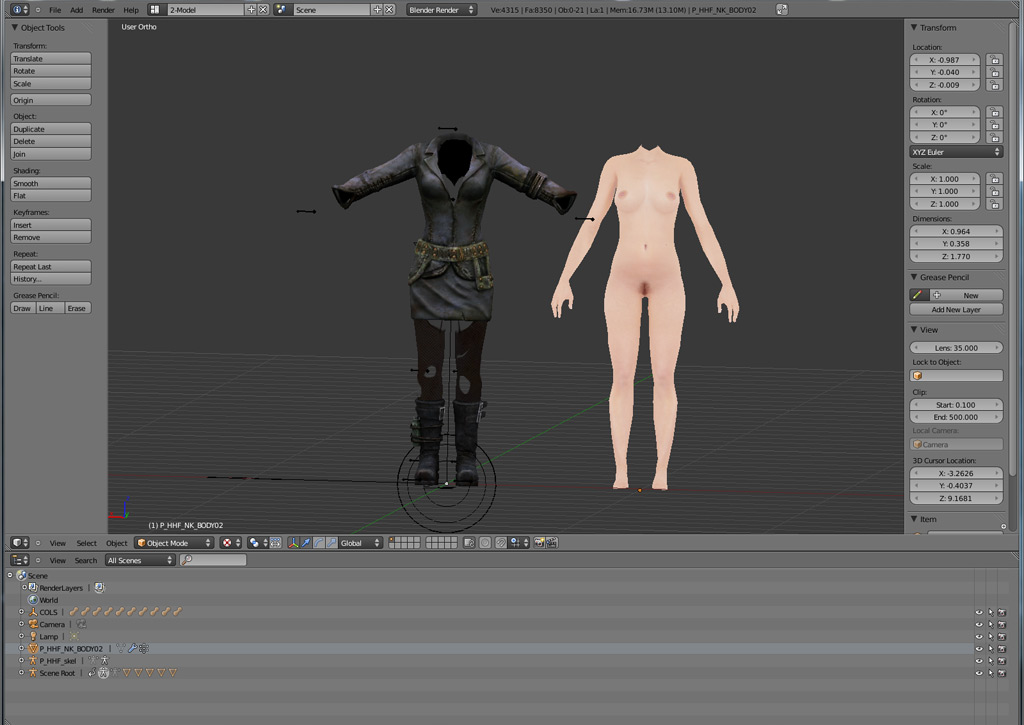

Just for the record, I also managed to get textures in somewhere in the past and even on this import they show when rendered (F12), but that's another topic. So what I have is the main mesh and an amature to work with. The amature is actually not the NWN2 skeleton, only a replacer to give you an idea where what is. Posing this or making changes to it is no option if I understand correctly, you can only use it to make sure the mesh fits it as good as possible. So much for mdb files, let's hop over to Blender 2.49 and .nifs:


Again using the default settings for the nif imports, I'm ending up with a model that looks quite okay for now. Note: I'm only using this one for testing, I only plan to convert content I'm allowed to convert ;) ). But, if you compare the picture with the mdb import above, you should already see a difference - the pose. A comparison pic from an older post:


So the main problem with all the new models is getting them into the same pose as the NWN2 skeleton. And booooy, that's where the trouble starts. I'm not even talking about making it fit exactly already, only about... lowering the arms?
The .nif model for example comes with no skeleton... or rather, there's some sort of amature included which I can't quite figure out how to use. When I try to move/rotate/etc, I get....


So. And that model should fit the base human mesh from NWN2 some day? I don't see that coming... I assume I have to make a new amature, and paint new weights... which, frankly, is only sentences I have picked up while reading the webz, because, hell I have no idea how to start with that.

What I know so far from resources like the Blender Noob to Pro is basic manipulation, I know how to grab, move, add verex points, edges, faces and cut them off, I also can scale bones... but that's it, and learning even that is very hard in Blender because it's the damn most unintuitive thing ever. I'm no computer illiterate, I learned the toolset, Photoshop, whatever, but.... this? This is rocket science. Anyway, rant over... switching to Make human now because the problem there is similar and yet different...
In make Human I created a slim female figure I'd like to use as a new base (I know people start with easy things usually, but I'm not interested in creating a new barrel for NWN2, I want to work on what I really want! ;) ). The big problem is that you can't pose in Make Human, but you get support for that in Blender. I export using the usual settings and import it, scaled to 0.13 which is the closest I can get to the NWN2 model. I end up with this:


Not too shabby, isn't it? The problem is, even though it comes with a skeleton and already set up for posing, actually posing it is much harder than I thought. Some rotations are completely impossible, like turning the hand. I found it almost impossible to come even remotely close to the NWN2 mesh. Here's what made last night:


Left you see the NWN2 model, right the Make Human. Yes, I managed to lower the arms, but it looks already less natural than the NWN2 one, even though the mesh is of a much higher quality. Look at the hands, I can't get them into the same position (important later for gloves or bare hands). And I can see the exact same problem coming with any Bethesda models too, all of them, even if I could manage to pose them, would be very hard to pose in detail. Details like... the Make Human skeleton doesn't even have all the finger bones, just one for each finger where the NWN2 skeleton features every knuckle (you want to make a fist later to hold a weapon, yes?).
Another issue is the heavily deformed mesh once you start posing things in Bender. Take shoulder and armpits...


You don't even see it that much here anymore because the arm is too low, but if it's at say... 20 degrees more upwards the armpit looks ridiculously deformed. The shoulder already looks absolutely unnatural. This is the problem with posing in Blender. If you compare it to Jester's base (posed in DAZ), the result looks much better:


Pity the DAZ body isn't to my liking and you can't pose the Make Human one in DAZ... anyway, you might say "who cares for nude bodies", but the same problem will probably occur with .nif models too (if they were even posable in Blender), I'm not looking forward to it.

All this is still very basic stuff. I've not talked about cutting heads off yet etc, but I managed this. Where it really gets over my head is the posing for one, then the whole "rigging up to NWN2 skeleton" thing which is absolutely mindblowing for me. But as you can see, my problems already start long before that.

To be continued.

Learning 3D stuffs, part one: The setup

As I said in my last post, I'm always looking jealously over at the Bethesda community which seems to put out hundreds of new models every week with ease, a lot of them armors or body replacers of high quality. The NWN2 community started off with quite some enthusiasm years ago too, but seems to have died out when it comes to nice clothes etc. Unacceptable! So the only solution is, trying it myself. As long as it's just retexturing of existing models, no problem, I have figured that out myself, being familiar with Photoshop and having learned the basics of file conventions in NWN2. But where I'm completely lost is the 3D side of things, actually doing stuff in a 3D app.

As some sort of reply to, say, Jester's helpful mails last year, the few tutorials I've found and Frank's comment to my last post, let me start with where I'm coming from and where I really get stuck.

As for NWN2 works, what I did so far can be seen in that little hak linked on the right (I still don't get why I have that age restricted thingy there). That is based on Jester's New Nudes (with clothes), basically a collection of textures attempting to suit every race as good as possible.
Furthermore, not uploaded, there's my attempt to use Jester's belt-slot clothes to create some dresses and undies. Example:


What you see up there is actually not a painted body model, but the lingerie is a 2nd model worn as an extra piece of clothing above the main body, enabling you to use any body texture with it (a blue one for Genasi, a dark one for drow etc.). The lingerie model is a piece of clothing worn as a second layer in the belt slot (NPCs) or gloves slot (PCs), based on Jester's catsuit model with most parts transparent. All this can be done in Photoshop alone, along with the regular NWN2 tools like mdb cloner, nVidia plugins for Photoshop etc. etc. And of course existing models, which is the tough part.
The problem is that I'm stuck with the basic shapes of those models, so a, say, dress with puffy arms, certain skirts etc. are not possible. Also, to get a bit more into detail, my undies like that up there look incredibly 2D, like paper cutouts. You can fake some structures with normal maps, but usually the seams never look convincing. To add actual volume, you need a model and edit it in a 3D app.

Anyway, this just to sum up the following: I'm familiar with NWN2 content and naming conventions, know how to use mdb cloner, know the basics about texturing in 2D, can edit 2das etc. etc.

Now let's get into 3D, because this is where I feel like a 3 year old....

Starting with my setup. I've collected most tools needed to import, export and edit both .nif (Bethesda) and .mdb (NWN) files, plus some tutorials:


Missing in that pic are of course the NWN2 toolset, standard tools like mdb cloner, NWN2 Packer and stuff I use for other things too like Photoshop (Elements and CS5 on the Mac side). I also have Gimp in there for some specific functions - mostly to follow a Blender tutorial, but there's also neat things like a "make seamless" filter to quickly create texture tiles, which requires a bit more work in Photoshop.

Where things already get messy is the basic setup of Blender and it's plugins: Certain plugins ask for certain versions. That's why you see both Blender 2.49 and Blender 2.62 in the folder. Finding out the right combination was already one of the most frustrating parts:

- 2.49 is required for importing/exporting Bethesda's .nif files, because the niftools haven't been updated yet.

- 2.62 is for the rest, including the .mdb plugins which have been updated. I also prefer using this version, and the two look so different that it's almost like learning two different 3D programs at once. I prefer to go with the newer version and only use 2.49 to import a .nif and save it for using in 2.62 later. After all I don't plan to export a .nif again.

Having both versions introduces a new problem: You have to change the install paths to get them both running at the same time, otherwise 2.62 overwrites the 2.49 content.
Also, what barely anyone tells you, stick with the 32bit versions!!! It took me a long and frustrating time to find out the 64bit version will only result in much more headache when installing the plugins.

Now for the required plugins:

- Niftools: Install only exactly following this post - No experiments. A 64bit version or a different python download than linked there will screw everything up. Don't try the alphas for newer Blender versions, screws things up too. Stick with the regular downloads and Blender 2.49.
The only exception - you can (additionally) use the latest release candidate of Nifscope, only this will enable you to get Skyrim models into Blender (a different topic for later, haven't tried it yet).

- mdb plugin: Not half as much headache installing it than the niftools. Works with the latest Blender release, as long as you stick again to the 32bit version all is fine. Remember you have to enable plugins in the User Preferences -> Add Ons of Blender before you can use them.

Additionally, as I've read in many places, Bone Weight Copy should make things much easier. It was included in past versions of Blender, now you have to find it again on the interwebz. Funny, the name of the original author sounds somewhat familiar.... <_<

With all the Blender stuff covered, maybe a few words on the additional stuff in my folder.

First we have the DAZStudio, which was a free download during February. This is almost exclusively for making human bodies (or clothes) and posing it. I was quite excited to get it for free first, but I'm a bit less excited now. I don't really like it. I wanted to use it for making a new base model that looks a bit more natural than what's available currently, but hell, they even want you to BUY the nipples... hahaha... I used Poser a long time ago, which would be more useful for that task. The big pro argument for DAZ is that you can actually pose the figure, a topic I'll get to in my 2nd part.


As an alternative to the above, we have an Open Source app called Make Human. I'm using the latest Nightly Build because it comes with quite a few new features not available in the stable one yet, and it works fine.
For making a base body I'd actually prefer this program by far over DAZ. Because the body looks much more natural (based on full body scans), you can make very believable fat/anorexic/etc persons and, well, it's not a biggy, but you don't have to pay extra for nipples (etc) too.


One of the big Pros of this program is that it has a very smooth Blender export, Blender actually comes with a Makehuman plugin by default and you get a posable, rigged, neatly setup model from Make Human into Blender with just a few clicks. Theoretically, because there are issues I'll mention later. One of the real big issues in this program is that you CAN'T pose yet. This issue is so big it almost ruins things completely. You can pose in Blender, but.... later.

Well, so much for the basic setup. You can also see some documentations in my folder, some from tips from Jester, some Blender tutorials, release notes. Hexagon, Bryce etc. are of no importance for NWN2 now.

Finally, there's also gmax in there. I don't know much more about gmax other than it's free basic version of 3D Max, fairly old, but should have enough functionality for NWN2 modelling... I haven't looked much into it yet.

To be continued.